
Cognito User Pools are fully managed user directories for your web and mobile apps. In Cognito’s default configuration it requires users to confirm their identity through a valid email address or phone number. In this article we will use Cognito Lambda Triggers to avoid personally identifiable information (PII) altogether, allowing for completely anonymous user sign-ups.
Introduction to Cognito User Pools
Most websites and apps allow users to either sign up with a username-password combination or to sign in through a third party like Apple, Google, or Facebook. A website might allow the logged-in user to access specific content or features, purchase items, or communicate with others. These users are called identities. Cognito User Pools are an Identity Provider (IdP): a service that provides sign-up and sign-in functionality, safely stores passwords, can organize users in groups, and enables password reset and MFA features.
When users sign in to a Cognito User Pool they receive Access, ID, and Refresh tokens in the form of JSON Web Tokens (JWT). These tokens can be stored in a browser’s local storage for long-lived sessions. The access token is used to identify the user in API requests, for example when fetching paid articles from a backend.
User sign-up
Most websites allow users to create their accounts. They require either an email address or username, and a password. Naturally, Cognito User Pools support these sign-up flows too. The following CDK code configures a Cognito User Pool with a mandatory email address. All examples in this article are available in a CDK project available on GitHub. The project also contains a simple user interface built in Gatsby, allowing for interactions with the User Pools.
# Create a userpool which requires an email address and verification
user_pool_default = cognito.UserPool(
    scope=self,
    id="UserPool",
    self_sign_up_enabled=True,
    account_recovery=cognito.AccountRecovery.EMAIL_ONLY,
    sign_in_aliases=cognito.SignInAliases(
        email=True,
        phone=False,
        username=False,
    ),
    removal_policy=cdk.RemovalPolicy.DESTROY,
)
When a user signs up to a Cognito User Pool configured like the one above, the User Pool will send out a verification email directly after the sign-up. This email might look like this.
The verification code for your account is 777541.Meanwhile, the website will display a screen asking for this verification code. The user provides their code to the website, verifying they have access to the provided email address. If the user tries to log in before they verified their account, Cognito returns an error.
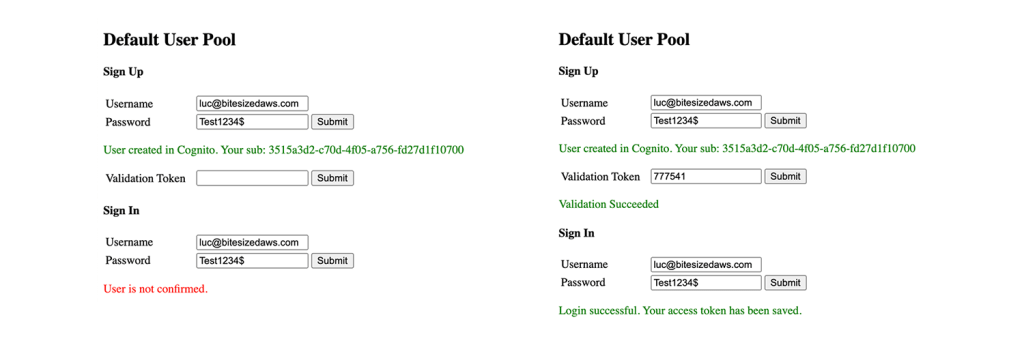
When the verification step has been completed, Cognito updates the user’s status to confirmed. The user is now allowed to sign in to the website. The following diagram displays an overview of the Cognito User Pools sign-up and sign-in process.

Anonymous users
The default Cognito auth flow requires users to provide some sort of verification of their identity – either an email address or phone number. But what if you’re building a site where users should be anonymous, like a whistleblower site? For these applications, you want users to create an arbitrary username, and you do not want to store any information which can lead back to your users. This can be achieved with Cognito using Cognito Lambda Triggers.
Cognito Lambda Triggers are common Lambda Functions like any other. Cognito User Pools can be configured to call these Lambda Functions when certain events occur, like a user signing up. There are 12 Cognito Lambda Triggers. An overview can be found in the table below.
| User Pool Flow | Operation | Description | Documentation |
|---|---|---|---|
| Custom Authentication Flow | Define Auth Challenge | Determines the next challenge in a custom auth flow | link |
| Create Auth Challenge | Creates a challenge in a custom auth flow | link | |
| Verify Auth Challenge Response | Determines if a response is correct in a custom auth flow | link | |
| Authentication Events | Pre Authentication Lambda Trigger | Custom validation to accept or deny the sign-in request | link |
| Post Authentication Lambda Trigger | Event logging for custom analytics | link | |
| Pre Token Generation Lambda Trigger | Augment or suppress token claims | link | |
| Sign-Up | Pre Sign-Up Lambda Trigger | Custom validation to accept or deny the sign-up request | link |
| Post Confirmation Lambda Trigger | Custom welcome messages or event logging for custom analytics | link | |
| Migrate User Lambda Trigger | Migrate a user from an existing user directory to user pools | link | |
| Messages | Custom Message Lambda Trigger | Advanced customization and localization of messages | link |
| Token Creation | Pre Token Generation Lambda Trigger | Add or remove attributes in Id tokens | link |
| Email and SMS third-party providers | Custom Sender Lambda Triggers | Use a third-party provider to send SMS and email messages | link |
Each of these Lambda Functions is optional: they are only included in the sign-in or sign-up flow when configured. For our anonymous Cognito User Pool we will focus on the Pre Sign-Up Lambda Trigger. To enable the Lambda Trigger for our User Pool, we update the CDK code as shown below.
# Create a userpool which does not require an email address or verification
user_pool_no_verify = cognito.UserPool(
    scope=self,
    id="UserPoolNoVerify",
    self_sign_up_enabled=True,
    account_recovery=cognito.AccountRecovery.NONE,
    sign_in_aliases=cognito.SignInAliases(
        email=False,
        phone=False,
        username=True,
    ),
    removal_policy=cdk.RemovalPolicy.DESTROY,
)

# Create a sign-up Lambda Function for the Pre Sign-Up Trigger
pre_sign_up_lambda_function = LambdaFunction(
    scope=self,
    construct_id="PreSignUpLambda",
    code=lambda_.Code.from_asset("lambda_functions/pre_sign_up"),
)

# Allow the Lambda Function to be executed by the Cognito User Pool
pre_sign_up_lambda_function.function.add_permission(
    scope=self,
    id="CognitoLambdaPermission",
    action="lambda:InvokeFunction",
    principal=iam.ServicePrincipal(service="cognito-idp.amazonaws.com"),
    source_arn=user_pool_no_verify.user_pool_arn,
)

# Add the Lambda Function as a Pre Sign-Up Trigger
cfn_user_pool: cognito.CfnUserPool = user_pool_no_verify.node.default_child
cfn_user_pool.lambda_config = cognito.CfnUserPool.LambdaConfigProperty(
    pre_sign_up=pre_sign_up_lambda_function.function.function_arn
)
The Lambda Function receives the following payload when a user signs up.
{
  "version": "1",
  "region": "eu-west-1",
  "userPoolId": "eu-west-1_8XVE45sSD",
  "userName": "luc",
  "callerContext": {
    "awsSdkVersion": "aws-sdk-js-3.45.0",
    "clientId": "63e6a5emisd8ecpdf3c0io401n"
  },
  "triggerSource": "PreSignUp_SignUp",
  "request": {
    "userAttributes": {},
    "validationData": null
  },
  "response": {
    "autoConfirmUser": false,
    "autoVerifyEmail": false,
    "autoVerifyPhone": false
  }
}
To enable anonymous users, the Lambda Function sets the response.autoConfirmUser field to True. With autoConfirmUser enabled, any user signing up is immediately confirmed, without validation emails or text messages.
import json

def event_handler(event, _context):
    print(json.dumps(event))

    event["response"]["autoConfirmUser"] = True
    return event
With these components in place, a user is confirmed immediately after sign-up. When a new user tries to sign in the attempt will succeed without further verification.

The sign-up flow now looks like the diagram below.

Other Cognito Lambda Triggers
In the example above we looked at the details of the Pre Sign-Up Lambda Trigger. We have seen that the Lambda Function receives an object, modifies one or more fields in the object, and returns the results to modify internal Cognito processes. The other 11 Lambda Triggers also receive contextual information in an object payload, but their response does not always take the same form.
For example, the Pre Authentication Lambda Trigger receives the following payload.
{
  "version": "1",
  "region": "eu-west-1",
  "userPoolId": "eu-west-1_Yomn919TM",
  "userName": "user@example.com",
  "callerContext": {
    "awsSdkVersion": "aws-sdk-js-3.45.0",
    "clientId": "421v3tjtf7fgcb2g33q2ef7lr1"
  },
  "triggerSource": "PreAuthentication_Authentication",
  "request": {
    "userAttributes": {
      "sub": "c6c30aab-9b44-4aed-b6f8-5857519243c2",
      "cognito:user_status": "CONFIRMED"
    },
    "validationData": null
  },
  "response": {}
}
When the Lambda Function approves the authentication attempt it returns the original event. When the authentication event is blocked, the Lambda Function raises an error. The following Python code raises an exception when a user has an example.com email address.
import json


def event_handler(event, _context):
    print(json.dumps(event))

    username: str = event["userName"]

    # If username contains an '@', partition() will return a
    # 3-tuple containing the part before the '@', the '@' itself
    # and the part after the '@'. If the '@' is not found, a 3-tuple
    # containing the original string and two empty strings is returned.
    email_components = username.partition("@")

    if email_components[2] == "example.com":
        raise Exception("Users from example.com are no longer allowed to log in")

    return event
With this Pre Authentication Lambda Trigger in place, Cognito returns an error when users with blocked email addresses attempt to log in.
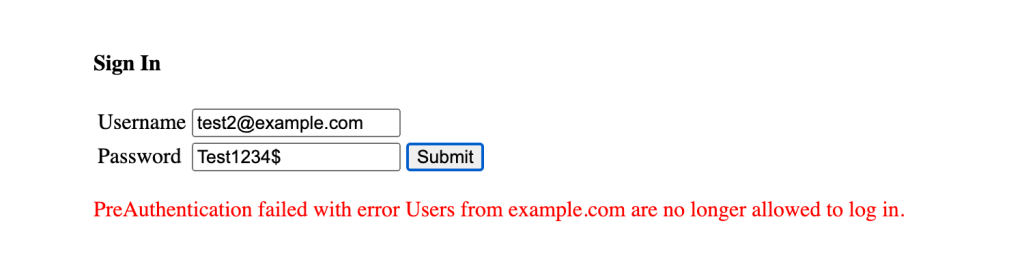
This Lambda Function could be extended to look up users in an external source. This source could, for example, be a DynamoDB Table used to maintain a ban or block list.
An overview of various sign-in and sign-up triggers can be found in the diagram below.

Conclusion
Cognito Lambda Triggers are a powerful way to change how Cognito User Pools handle user interactions. In this article we looked at auto-verification and blocking user sign-ins, but there are many other Lambda Triggers to explore. Because the Cognito Lambda Triggers run like any other Lambda Function, they can interact with external systems, allowing for powerful integrations.
 Luc van Donkersgoed's Notes