
The AWS News Feed has an extensive end-to-end testing suite. Broad test coverage allows us to move fast without breaking things. But email validation has always been a challenge – how do you know emails were correctly sent, and how can you make your end-to-end tests respond to the contents of the emails, such as clicking a validation link? In this post I will describe how I solved these problems with SES and SQS.
The testing environment
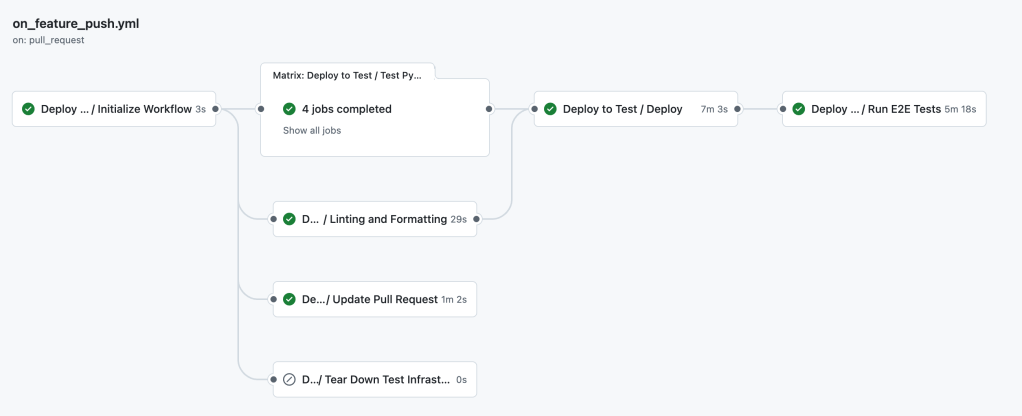
For every pull request an ephemeral stack is created in my test environment. When the stack is deployed, the E2E test suite runs against the live resources. You can see this process in the GitHub Actions workflow below.
The E2E test suite itself is written in behave using the Gherkin natural language syntax to describe the test cases. An example can be seen below: this test validates that an unauthenticated user is successfully blocked from accessing protected endpoints.
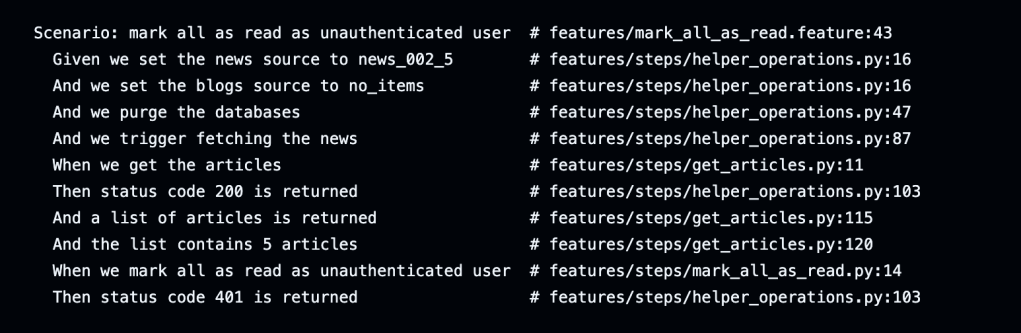
At this moment the test suite tests 60+ scenarios in about 5 minutes. This gives me pretty good assurances that the pull request does not introduce any regressions. The tests focus primarily on API endpoints: execute a request, validate the output, do another request, validate the output again.
But the most popular feature of the AWS News Feed does not depend on an API endpoint. It is the daily, weekly and monthly email digest feature, which provides my users with periodic emails with the hottest announcements and blog posts. Breaking this feature would disappoint many people, including myself. So how does this system work?
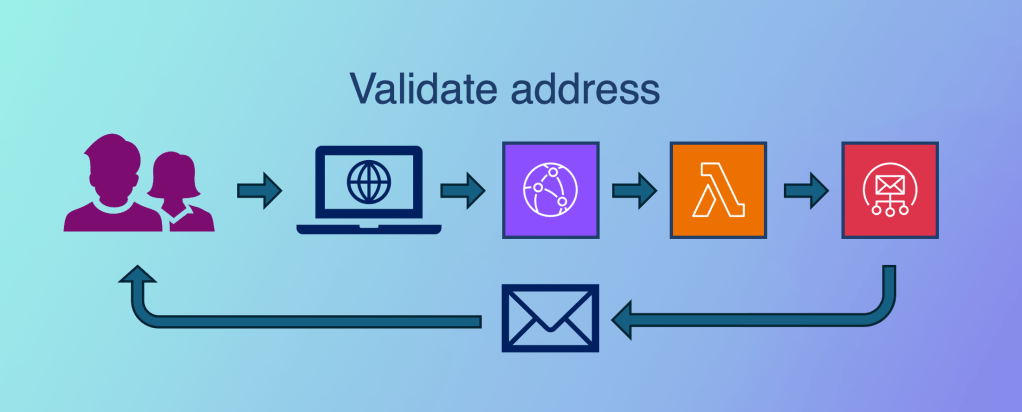
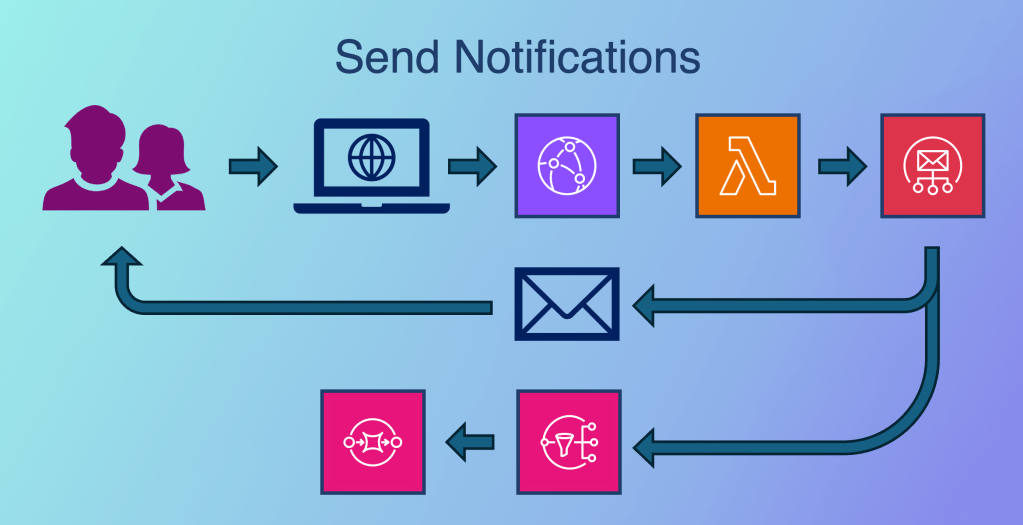
First, users visit the website and subscribe to the digests. This is a simple API call which synchronously calls Amazon Simple Email Service (SES) to send an “verify your email address” email.
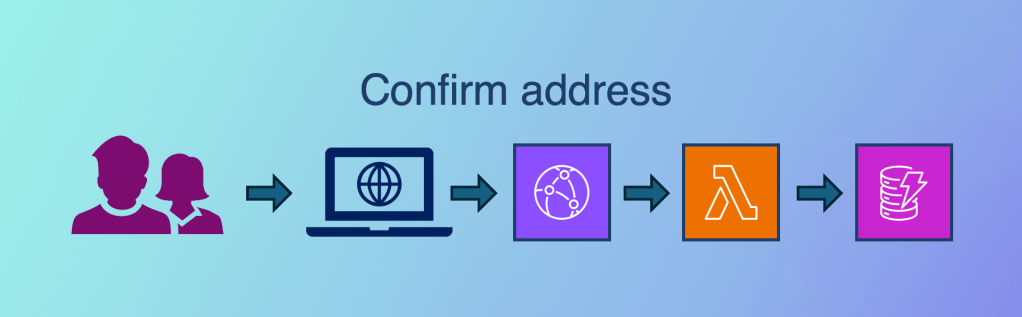
Next, users click the link in the email to verify their address. This results in the subscription being stored in the database and the recipients being included in the next email batch.
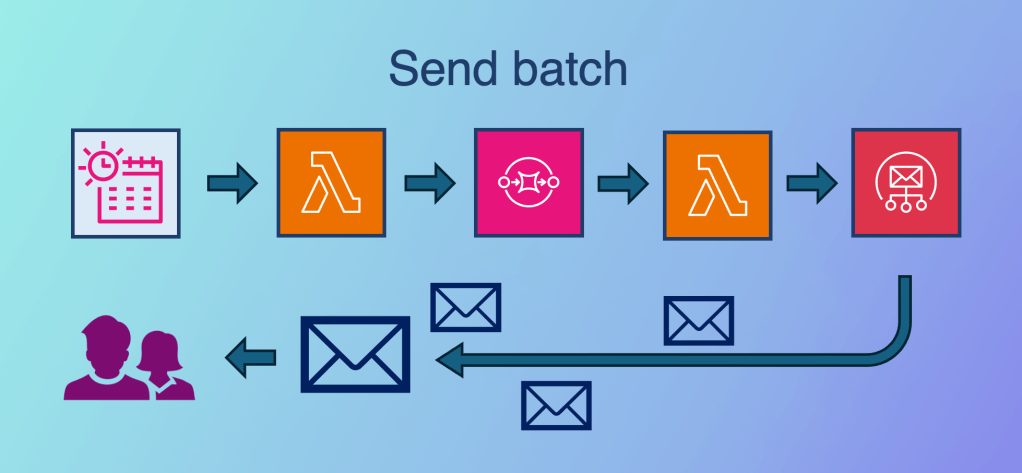
Sending the batch requires a slightly more complex system. SES has rate limits for sending emails – my quota is currently set to max 14 emails per second. Because the batch contains thousands of recipients, the system cannot send them all at once. To overcome this problem the system writes an entry per recipient in an SQS queue. Another Lambda function consumes this queue with a maximum concurrency of 2. Because the average execution time for calling SES is 183ms, this system rate limits outgoing messages at about 11 emails per second. So far so good. But how do we validate this behavior in our end-to-end test suite?
SNS destination for event publishing
The solution starts with setting up an Amazon SNS event destination for event publishing. This feature allows us to receive notifications for bounce, complaint, reject, send, delivery, and more events. In our use case we’re only interested in the “Send” event. We configure the SNS topic and add an SQS queue to store the notifications. Note: the delivery events do not include the email body, only headers and metadata. We will see this is important below. For details about the notification events, see the AWS documentation.
Synchronous email testing
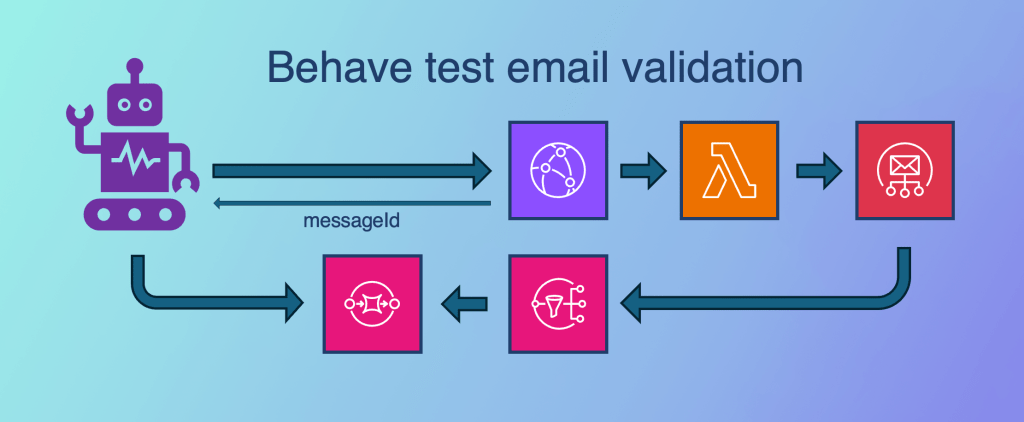
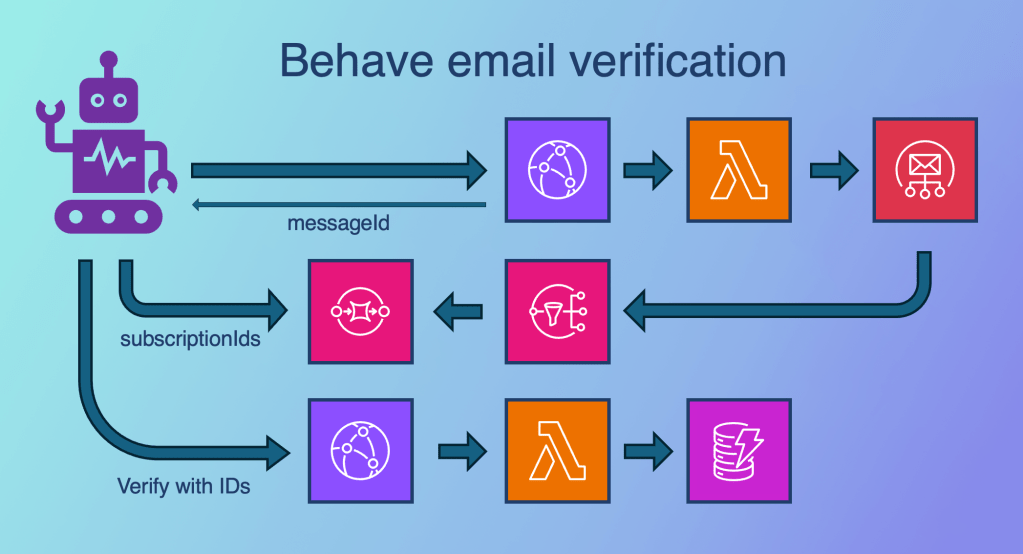
Now that we can receive email notifications for every sent email we can start testing. We will start with the validation email, and replace the human with our behave testing framework. The test will call the /subscribe endpoint, which will synchronously send an email using Simple Email Service. SES will generate a messageId, and the Lambda function has been configured to return this ID in its response.
Next, the behave framework polls the SQS queue until it finds the email send notification with the same messageId. This confirms the backend system has successfully sent the email message.
Handling the missing email body
But our end-to-end tests don’t stop there. Receiving the validation email is nice, but we want to actually validate the email address and receive a digest email too! The problem is that the SNS notification does not include the email message body, so we have no way to access the validation link and automate clicking it.
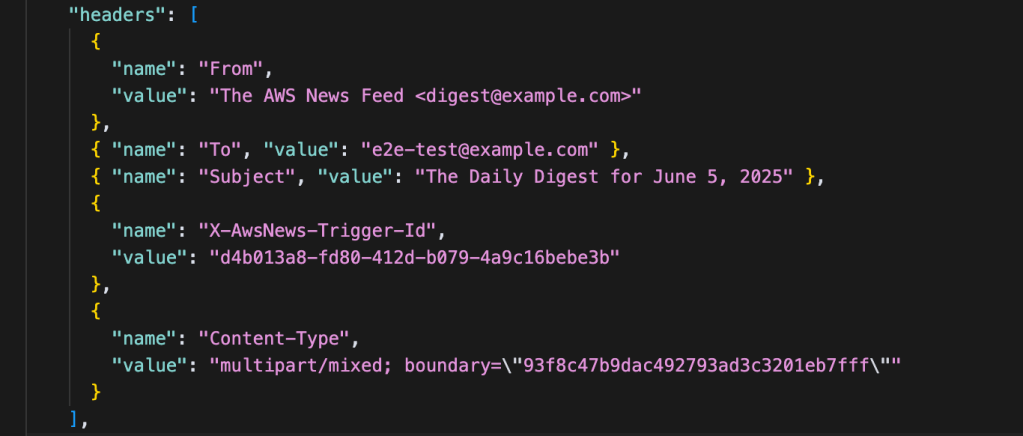
We can solve this by adding custom headers to the email message. These headers will be included in every email, but they will be invisible in normal email clients. And most importantly, they will also be included in the SNS Send notification. Consider the example below, and see that it includes the X-AwsNews-Subscription-Ids header. These IDs are used to verify the subscription, and they are all we need to simulate the verification request.
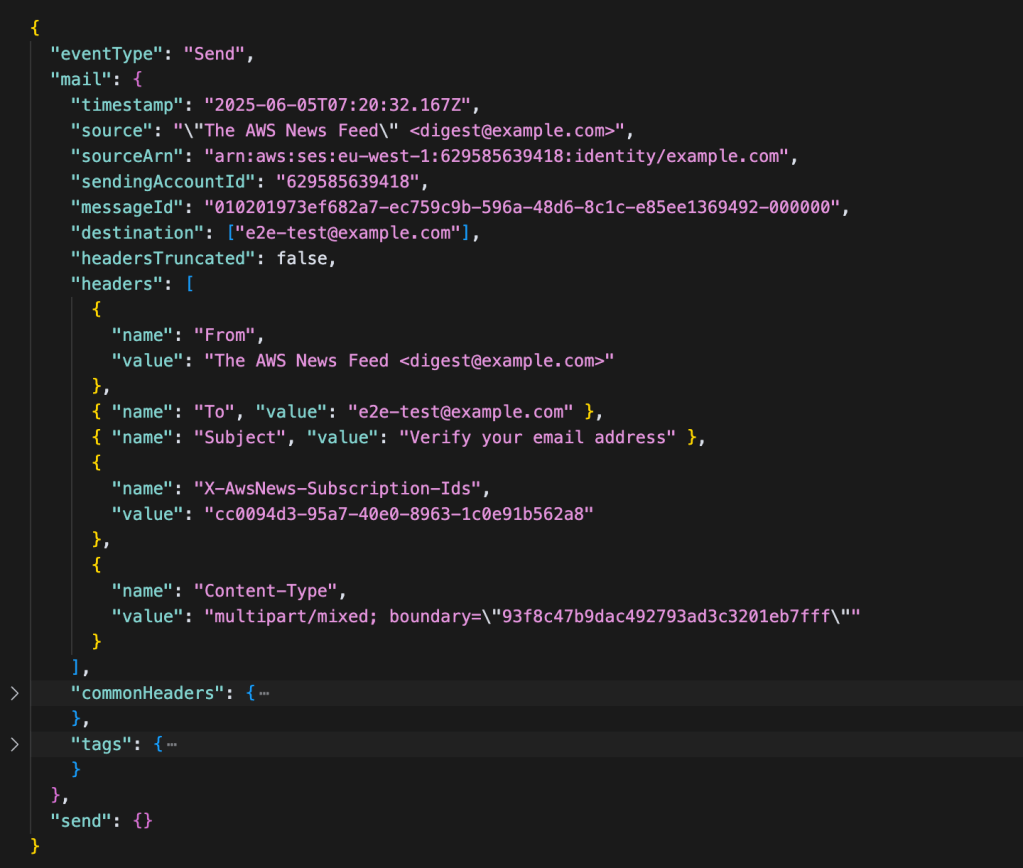
With the X-AwsNews-Subscription-Ids in hand, the behave framework can call the /verify endpoint and make sure its test email address is verified in the database – all without ever receiving or reading a real email.
Asynchronous email sending
This brings us to the last section of the end-to-end email testing story. With the verified email address, behave is able to validate that triggering digest emails results in emails being sent by SES. This is the most important test, because sending digests to our thousands of subscribers is a core functionality of the AWS News Feed. It is also the part that could invisibly break, because it is an asynchronous process. Let’s see how we can verify this system works as expected.
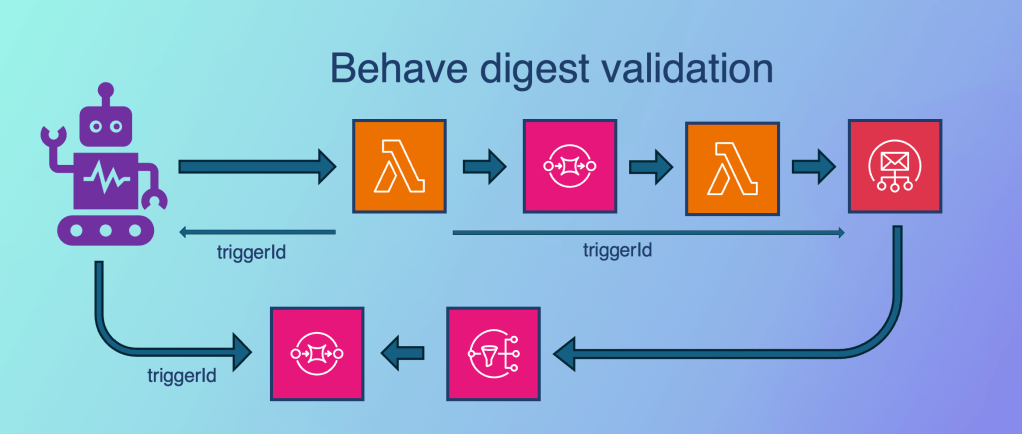
In normal operations a scheduled event triggers the generation and batch send of digest emails. In our end-to-end tests, we let behave trigger the process. The first Lambda function cannot return an SES messageId like before, because it does not directly invoke SES. To still be able to track the message through our systems, we let the trigger Lambda function generate a unique triggerId and return this to the caller – the behave framework. Then we add the triggerId to the messages on SQS, and make the second Lambda function add it to the SES email headers again.
By tracing the triggerId throughout the system, the behave tests can validate that the email send notifications on the SQS queue were generated by the expected digest generation. This allows us to match the exact number of recipients. If there are other things we need to verify in the email contents, such as the correct number of articles included or the correct sponsor message being displayed, we can enrich the email headers as needed.
Other email platforms
This article focused on Amazon Simple Email Service as the email platform. If you’re using another platform like MailChimp or SendGrid the same principles apply. As long as the tool returns a message ID for sent messages, has an event-based notification system to hook into, and supports custom email headers, the solution in this article should fit any email product.
Conclusion
In this post we discussed the value of end-to-end testing and its most common use case: testing REST APIs. We then determined that testing only REST APIs leaves a big testing gap when email delivery is a primary use case. We saw that we can use the event notification system and custom headers in Amazon SES to trace emails through its entire delivery process, even if it involves asynchronous components.
I hope this helps you build better tests, rely more on automation, and ship new features faster!

