
The AWS News Feed always had literal title search. Literal search returns exact matches and does not consider the articles’ contents. This limits the value of the search feature, especially when searching for capabilities like video streaming or scaling Kafka brokers. The solution is semantic content search. In this article we will explain how we implemented content search using S3 vector buckets, and how semantic search fits into the larger AWS News Feed architecture.
Embeddings – the tech at the heart of semantic search
Semantic search (searching for things that have similar meaning) is very different from literal search. With literal search, the exact sequence of letters in the search term must match the content (i.e. the word dog is found in the phrase who let the dogs out, but feline isn’t found in the phrase who let the cat out of the bag). With semantic search, phrases don’t get a literal true-or-false value if they match, but instead get a similarity score. In cosine similarity, for example, a score of 1.00 means two phrases are semantically identical, 0.90 means they are alike, and 0.10 means they are hardly alike. As such, dog and canine will get a very high similarity score, cat and dog get a moderately high score, and cat and kitchen sink a very low score.
The technology which powers semantic similarity comparison is an embeddings model. This model converts input (e.g. text or images) to a numeric representation known as vectors. These vectors are also called the input’s embeddings. In the example below we have vectors in two dimensions: animal-ness on the X-axis and size on the Y axis. Words like dog, cat, and pizza get a score on each of these dimensions. Because related words get similar values, words which are close together have similar meaning. In the example we use two dimensions, but modern embeddings models use hundreds or thousands of dimensions to classify input. Unfortunately it is impossible to visually represent more than three dimensions on a computer screen.
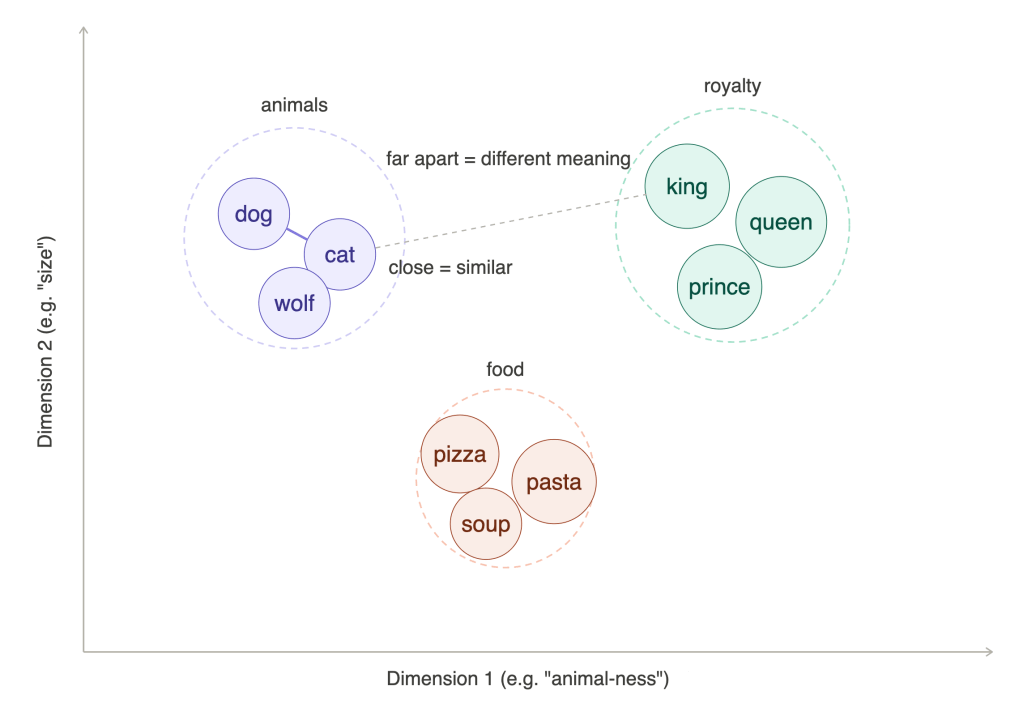
A keen eye will see that the diagram above shows clusters of words. The fact that similar concepts cluster together is used for features like related articles, you might also like …, or personalized playlists, which recommend content close to (or clustered with) your listening history or taste.
In a practical sense, embeddings are just lists of floating point numbers representing some content. For example, the cohere.embed-english-v3 model creates the following embeddings for the word “dog”:
[-0.012, 0.021, -0.004, -0.014, -0.035, -0.027, -0.024, -0.016, 0.035, -0.001, [... continued to 1024 values]].
The output for the word “canine” is:
[0.0016, 0.013, -0.009, -0.032, -0.034, -0.025, -0.043, -0.006, 0.004, 0.003, …].
And the output for “kitchen sink”:
[-0.009, 0.002, -0.001, -0.006, -0.034, -0.008, -0.016, -0.017, -0.017, 0.056, …]
In the next section we will discuss how to compare these vectors and find semantically related terms.
Using S3 Vector Buckets to store embeddings and find neighbors
In the previous section we learned how an embeddings model allows us to convert content to vectors, and how similar input will yield similar vector representations. The similarity between two vectors can be calculated using various mathematical formulas. The most commonly used ones are cosine similarity, dot product similarity, and euclidean distance. Each of these mechanisms take two vectors and return a single number (the distance or similarity). Compare a search term to a thousand articles, and the most relevant search result will have the closest distance or highest similarity value. Likewise, the top 10 closest distances will be the top 10 best matching articles.
Now all we need is a mechanism to calculate these distances at scale. There are quite a few products with this capability, including Elasticsearch / Opensearch, Postgresql with pgvector, and since December 2025: S3 vector buckets. All these products allow developers to store entries as a combination of a unique key, embeddings, and metadata. The main difference between databases with vector search and S3 vector buckets is cost and latency: databases keep all data and indexes in memory and can find results in single-digit milliseconds. This is fast but expensive. S3 vector buckets use a combination of hot and cold storage which is much more cost effective, but slower – the average query time is around 400ms and the slowest queries can take up to 1 second. This is still a very acceptable delay for a search query though.
To store embeddings we use the S3 vector buckets put_vectors() API call:
self._s3vectors_client.put_vectors( vectorBucketName=self._config_service.s3vectors_bucket_name, indexName=self._config_service.s3vectors_index_name, vectors=[ { "key": f"{v.article_id}#{v.paragraph_index}", "data": {"float32": v.embedding}, "metadata": { k: val for k, val in { "article_id": v.article_id, "external_id": v.external_id, "paragraph_index": v.paragraph_index, "section_title": v.section_title, "article_title": v.article_title, "article_url": v.article_url, "article_date": v.article_date, "article_type": v.article_type, "article_slug": v.article_slug, "chunk_text": v.chunk_text, }.items() if val is not None }, } for v in batch ],)
To search for vectors we use the query_vectors() call:
response = self._s3vectors_client.query_vectors( vectorBucketName=self._config_service.s3vectors_bucket_name, indexName=self._config_service.s3vectors_index_name, topK=top_k, queryVector={"float32": query_embedding}, returnMetadata=True, returnDistance=True,)
The response of this call might look something like this:
{ "vectors": [ { "distance": 0.43668508529663086, "key": "019d0224-7116-9559-2813-381d1b7c9e94#6", "metadata": { "article_url": "https://aws.amazon.com/blogs/big-data/best-practices-for-amazon-redshift-lambda-user-defined-functions/", "article_date": "2026-03-18", "article_title": "Best practices for Amazon Redshift Lambda User-Defined Functions", "article_slug": "2026-03-18-best-practices-for-amazon-redshift-lambda-user-defined-functions", "paragraph_index": 6, "chunk_text": "AWS Lambda is a compute service that lets you run code [...]", "external_id": "blog-posts#33-88730", "article_type": "Blog", "section_title": "Introduction", "article_id": "019d0224-7116-9559-2813-381d1b7c9e94" } }, { "distance": 0.53926682472229, "key": "019a98e3-2baa-1de3-f785-e5b62317c25c#2", "metadata": { "paragraph_index": 2, "section_title": "Introduction", "article_type": "Blog", "article_slug": "2025-11-18-python-314-runtime-now-available-in-aws-lambda", "article_date": "2025-11-18", "article_title": "Python 3.14 runtime now available in AWS Lambda", "chunk_text": "AWS Lambda now supports Python3.14 as both [...]", "article_url": "https: //aws.amazon.com/blogs/compute/python-3-14-runtime-now-available-in-aws-lambda/", "article_id": "019a98e3-2baa-1de3-f785-e5b62317c25c", "external_id": "blog-posts#4-25136" } } ], "distanceMetric": "cosine"}
With embeddings and a queryable vector store we have all the technology we need to build a semantic search solution. Now we just need to decide what to store.
Clean input is fundamental
The primary factor influencing if a search feature is good or bad is whether the results match the user’s expectations. For example, if the user searches for “python 3.13” and python 3.12 results are scored higher than the 3.13 results – that’s bad. Same if the user searches for video streaming, but the results are about websockets, and so on. So how do we make sure we get good results?
The answer lies in choosing the correct input for embeddings. This starts with cleanup. The original articles on the source AWS blogs and news feeds have a lot of fluff around the core content. There is a page header, a footer, links to relevant pages, marketing statements, comments, and much more. We need to strip this away to get to the essence of the article.
Once we have extracted the essence we need to remove HTML markup, because this too adds content which is irrelevant to the article’s semantic meaning. An easy way to achieve this is by converting the HTML to markdown – a language with remarkably little noise which language models are very good at interpreting.
After the previous step we have a clean representation of the original post. But if we take a full 3000-word blog post and generate its vector representation, it still wouldn’t be very useful. The representation would be the average of all the words and their semantic meanings, which would be like mixing all colors in a painting – the result wouldn’t be very representative of the original. Instead, we use chunking to split the content into smaller segments. We split by paragraph, as determined by headings and newlines. Each chunk can at most contain 1500 characters, while smaller consecutive chunks are merged to give them a little more body. This screenshot shows an example of the final product:
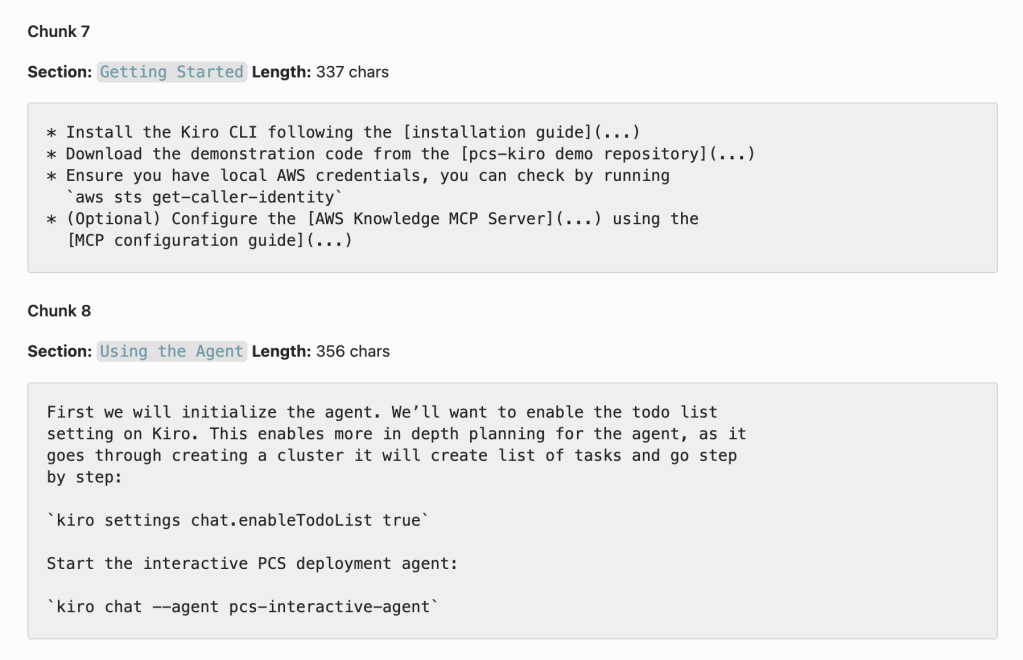
As you can see, the result is a list of reasonably sized chunks with pure content, each with exact semantic meaning. These chunks are fed into the embeddings model and then stored in the vector database for querying and retrieval.
The process described above (downloading HTML -> stripping core content -> converting to marktdown -> chunking) leads to precise search results. A content pipeline like this is essential for a high quality semantic search feature.
Integration with the rest of AWS News
Until now we have covered the semantic search functionality in isolation. But of course, both the trigger and the output integrate deeply with the rest of the application stack.
Triggers for the embeddings creation process
The AWS News Feed periodically checks for new content on the source data feeds. It maintains an idempotency table which guarantees the same article is not processed twice. When a new article is found, the markdown is extracted and an article summary is created by an LLM. When this process is complete, a SummaryGenerated event is emitted.

The embeddings process listens to the SummaryGenerated event. When it is received, it starts the chunking process, runs the embeddings model on each chunk, and then stores the batch of chunks in the S3 vector bucket, including the metadata about the original article.

An additional benefit of this event driven approach is that if article summaries are updated by some other process, for example when the article is reindexed, the search entries are automatically updated as well.
Integration in the frontend
The AWS News Frontend has a new page at https://aws-news.com/search. Fill in a search term and it will be sent in a POST request to the backend. There, embeddings for the search term will be generated with the same model used to create vector representations of the original chunks. The search term vectors are then used to query the S3 vector bucket, and the results are returned in the HTTP response and displayed in a list. In the screenshot below you can see how the article chunks are used in the search results.
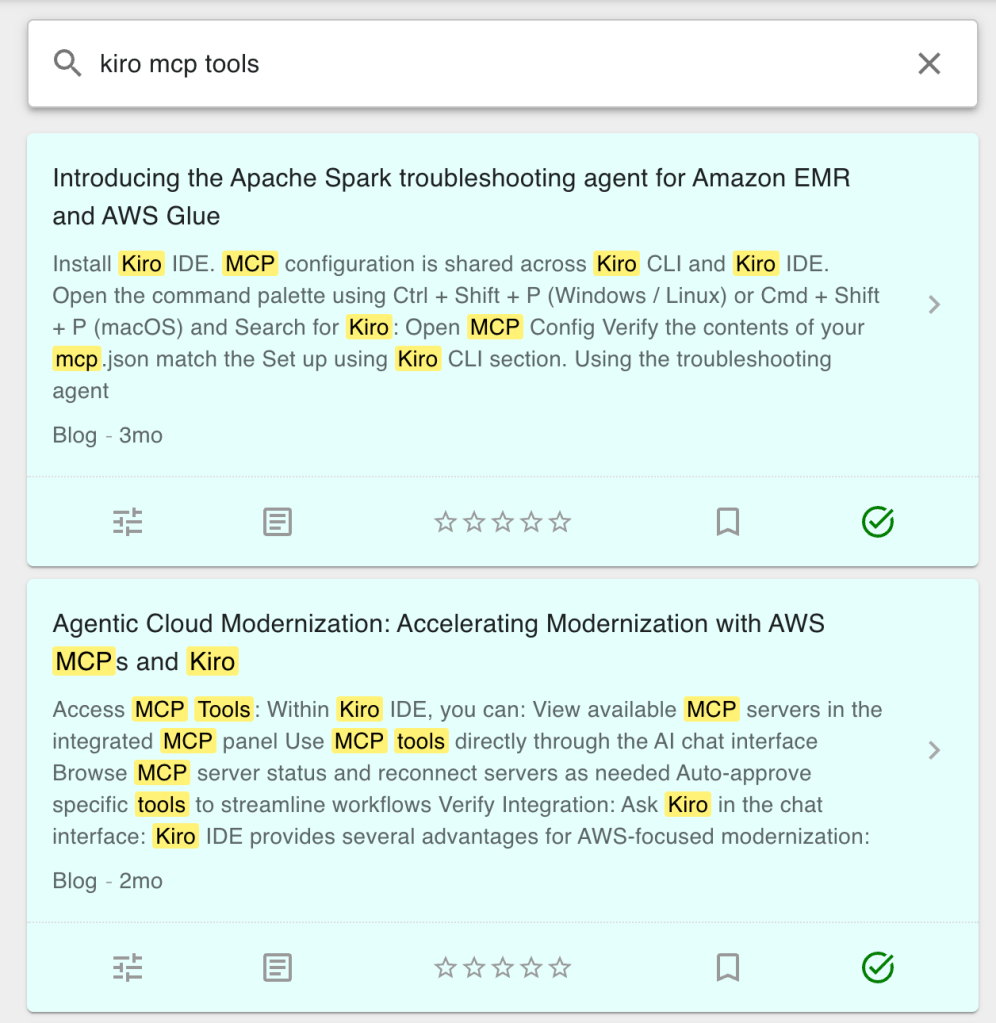
To visualize the process (and to see how simple it really is), consider the observability trace for the GET /search request below. The search results were returned in about 750ms, with about 330ms spent on creating embeddings and about 400ms on querying the vector bucket.

Value for agentic AI
In this article we focused on human interactions with a search interface. It’s interesting to note that the topics covered above are an exact mirror of how many tools for agentic AI work: information is stored and indexed in a semantically searchable system (using embeddings and vector distances), so that LLMs can use natural language to find the most relevant information for its job – whether these are articles in a knowledge base, lines of code in a software project, or legal contracts in an administration system.
Imagine an AWS News agent: you could ask “when was python 3.13 released on AWS Lambda”, after which the agent could use the semantic search feature to search for “python 3.13 lambda”, retrieve the most relevant articles, and use the contents to accurately answer the question. This is exactly how modern AI agents work.
Conclusion
Semantic search is the most natural way to interact with a large information system. Users (flesh or silicon based) do not need to consider the exact semantics, phrasing, or grammar of what they are searching for. As long as their search terms are semantically close to the contents of the article, the correct results will be returned. In this article we described the core technologies underpinning semantic search and how it is implemented in a real production system. I hope this will help you build semantic system in your own applications too!
 Luc van Donkersgoed's Notes