
AWS recently released Lambda MicroVMs: ephemeral, isolated VMs with a lifetime of up to eight hours and very fast startup times. As an experiment I tried to use them as GitHub Actions runners and came away pleasantly surprised.
TL;DR – Lambda MicroVMs can absolutely be used as GitHub runners. The primary benefits are customisability of the runners and the fact that they run in your own AWS account. These allow for optimisations you can’t do in hosted runners. The downside is that you need to run and maintain your own infrastructure.
The infrastructure itself isn’t very complicated – it includes an API gateway, two Lambda functions, two SQS queues, some SSM secret parameters and the Lambda MicroVM runners themselves. Builds are triggered by listening to GitHub webhook events.
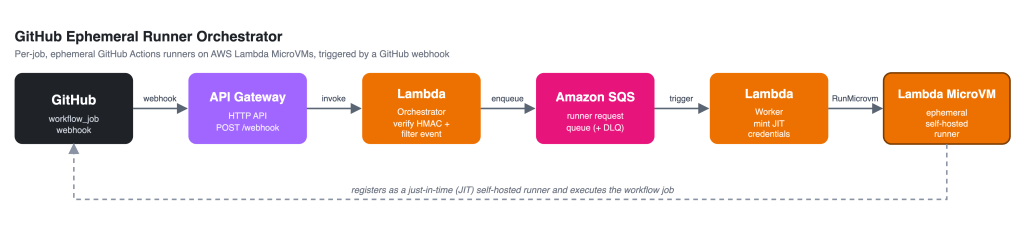
I published a working CDK project of the infrastructure on GitHub: GitHub Runner Orchestrator. Feel free to clone it for reference, inspiration, or scaffolding your own MicroVM runners.
The use case
I run a lot of actions on GitHub for The AWS News Feed and other projects. Some build, deploy, and test steps can take quite some time to execute, lengthening the feedback loop. When Lambda MicroVMs were launched I figured they might allow me to optimize some processes. The two main areas of improvement I was looking for were (1) pre-warming environments with common binaries, packages and libraries, and (2) reducing latency between the runners and my environments for E2E testing.
Lambda MicroVMs vs. CodeBuild
At this point you might think: didn’t we have AWS CodeBuild for this? The answer is yeaahhh, but not really. CodeBuild has some problems, including very long startup times and capacity issues. Its design paradigms are also not a great fit for GitHub runners – they’re not true virtual machines like the native GitHub runners are. Lambda MicroVMs are a better fit because their images are built once during an out-of-band build phase, then snapshotted and stored. Booting this snapshot takes just a few seconds. The resulting VM has a full operating system which just needs to connect to the GitHub control plane and is almost immediately ready to start work.
The good
Let’s start with the good news. Lambda MicroVMs are fully compatible as GitHub runners. Setting them up and configuring them is a bit of a hassle, but using my sample repository on GitHub might save you some time.
Customising the image and pre-warming packages, libraries, images, and docker layers also works like a charm. It’s a matter of including them in the Lambda MicroVM Dockerfile so they are included in the snapshot. When GitHub actions use your images all pre-warmed contents are immediately available, which in my case saved minutes of execution time.
The biggest benefits I saw were gained in network latency. All my applications run in the AWS Ireland region, while the default GitHub runners are hosted in datacenters in the United States. I have a large suite of end-to-end tests which call my APIs hundreds of times. Each 200ms API roundtrip addition adds minutes to the full execution cycle. Running the E2E test suite in an AWS account in Ireland cost about 5 minutes, down from 8 minutes on GitHub hosted runners.
The neutral
Lambda MicroVMs only support arm64 processors (based on Graviton 3 and 4). If your processes require x86_64 runners MicroVMs cannot help you. I don’t consider this a problem, I prefer arm64 where I can anyway.
When I started the MicroVM project I hoped to save some cost too. In practice, however, the cost for MicroVMs is very close to native GitHub actions. A GitHub Actions linux_2_core_arm instance costs $0.005 per minute. A MicroVM with 2 vCPUs and 4GB of memory costs $0.0044 per minute. MicroVMs also incur a cost for storing, reading, and writing snapshot data. In my environments, these added about $1,50 per month in charges.
A minor note on billing: AWS bills per second while GitHub bills per minute. If you have many short jobs, the AWS model might work in your benefit.
I also hoped the runners might be slightly faster in terms of CPU clock speed or memory bandwidth, but in practice the difference between GitHub native runners and MicroVMs was not significant enough to notice.
The bad
The biggest downside of hosting your own runners, on Lambda MicroVM or otherwise, is the operational responsibility. You now own the patching cadence, security baseline, incident management, deployment pipelines, infrastructure, the works. With GitHub actions you just use ubuntu-24.04-arm or something like it, and the infrastructure and patching is invisibly managed for you.
Lambda MicroVMS also come – at least in my accounts – with pretty low default quotas. You can request to raise these through AWS support, but it’s a bit of a roll of the dice if you’ll get the requested allotment. In one of my accounts with years of history it was denied, but when I opened a new account and placed the request there it was approved after a few days 🤷♀️.
Other benefits of MicroVMs
Some Lambda MicroVM benefits I did not use, but might be very valuable to you:
- Tenant isolation: each MicroVM lives in full disk / memory / CPU / network isolation. This is also true for CodeBuild, but very much not true for Lambda Functions. This guarantees that anything you run in a MicroVM will be inaccessible by every other VM instance.
- VPC access: Lambda MicroVMs can interface with your local VPC. This allows you to integrate them with databases, private APIs, OpenTelemetry collectors, and so on. It also allows you to monitor / filter outbound network traffic, which in turn can be used to prevent access to untrusted sources (like https://registry.npmjs.org if you want to enforce the use of a private registry).
- Local caching: You can build your own AWS-based caching system for assets, packages or layers and configure MicroVMs to use it. This can further increase your build efficiency.
- Availability: Sometimes GitHub runners are down or spotty. Having MicroVMs as a fallback can keep your pipelines online even when parts of GitHub aren’t.
Conclusion
Lambda MicroVMs are a very valid candidate for GitHub self-hosted runners. The initial setup takes some effort, but once it’s deployed it’s fully serverless, auto-scaling, and highly available. MicroVM-based runners benefit from proximity and integration options with other AWS resources, very fast boot times, and the ability to pre-warm images for faster runner execution. The primary downside is the operational responsibility that comes with it.
If your builds benefit from running in an AWS account, I would recommend MicroVMs over CodeBuild any day of the week. Happy building!

